

You’ve typed the same sentence over and over, your finger hovers over ‘send’ – but then you pause. Do you sound too pushy with that phrasing? Or is it not professional enough? Do you even need an emoji at the end or does that just come off as informal? Do you really even know how to write an email?
If writing emails to your boss makes you break out into a cold sweat, you’re not alone. But here’s the thing – email anxiety doesn’t have to ruin your day. With the right framework to work with, you can write emails that get read, get a response, and even help build a better relationship with your supervisor.
Let’s break down exactly how to write an email that gets the job done without keeping you up at night.
Why Learning How to Write an Email To Your Boss Actually Matters
Your emails will either leave a good first impression or a not so good one, whether you like it or not. Every work email you send off to your boss, hiring manager, or supervisor paints a picture of how you communicate, how professional you are, and by extension, how competent you are at your job.
But here’s what most people get wrong: bad or good impressions aren’t made by one big, important email – they’re built through dozens of small messages – emails about meetings, quick questions about current projects, and status updates that show you’ve got a handle on things.
But when you spend extra minutes or even hours agonizing over something that should take two minutes to write – you’re not just wasting time. You’re:
- Delaying key information that could help move things forward
- Missing chances to build a rapport with your boss
- Reinforcing anxiety patterns that make future emails even harder to write
- Damaging your confidence in pretty much all your professional interactions
The good news is that writing good emails is a skill – and it’s something anyone can learn. Its not some magical talent you either have or you don’t.
Anatomy of a Perfect Email for High Response Rate
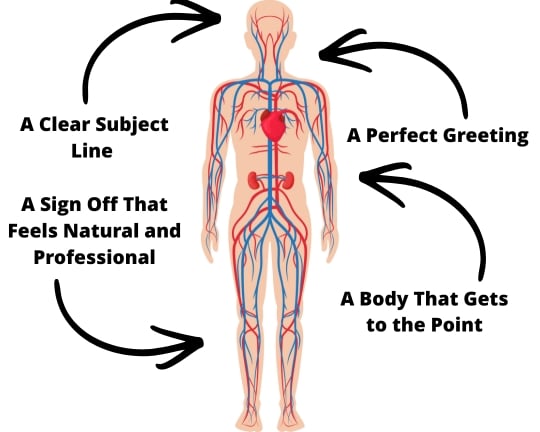
Before we get into the nitty-gritty, let’s talk about what makes a professional email actually hit the mark. Think of this as your go-to template for pretty much every professional business emails with the appropriate level of formality.
A great email has 5 essential elements:
- A clear subject line that tells your boss in one sentence what they can expect
- A greeting that’s in line with your company’s culture – nothing too formal or too casual
- A message that gets right to the main points without wasting your boss’s time
- Specific next steps or things you need them to do – as clear as can be
- A sign off that feels natural and professional, rather than forced
The thing is, it’s not about making each part perfect in isolation. It’s about getting all of these elements to work together seamlessly so that your boss barely even notices the structure. What they notice is that they can easily pick up on what you’re trying to say and that you’re getting your entire message across with no fuss.
How to Write an Email Subject Line That Grabs the Attention of the Recipient
Your email subject line may be the single most important sentence you write. Why? Because your boss gets flooded with lots of new emails all day. So, they have to decide in split-second what is worthy of their attention.
Here are examples of subject lines that get ignored:
- “Quick question”
- “Following up”
- “Thoughts?”
Here are examples of subject lines that actually get a response:
- “Budget approval needed for Q2 campaign by Friday”
- “Three options for client timeline issue”
- “Update: Chapel Hill project completed early”
See the difference between a half-hearted subject line and a good one? The good subject line lets your boss know exactly what’s inside and whether they need to act on it urgently – so they can plan their day around it.
Here are a few formulas for writing specific subject lines that actually do what they’re meant to:
- For follow-up emails: “Following up: [Specific topic from our last chat]”
- For requests: “[Action needed] + [Brief context] + [When you need it]”
- For updates: “Update: [Project name] + [Current status]”
- For questions: “Question about [specific thing] for [specific reason]”
The best way to think about subject lines is to imagine your boss scrolling through their inbox at 6 AM with a cup of coffee in their hand. Your subject line needs to be clear enough to answer those two questions – “What is this?” and “Is this urgent?” in five seconds.
Professional Email Greetings That Set the Right Tone

What’s the right way to say hello to your boss? Should it be a “Hi Sarah” or a “Dear Ms. Johnson”? What about “Hey” versus “Hello”? And is “Dear Sir” even still a valid option?
The truth is the answer all depends on your company culture, your relationship with the recipient of your email, and what type of message you’re sending. You just have to make sure the way you say hello is right for the situation.
For formal professional settings (making first contact, emailing top management, or someone from outside of the company):
- “Dear [First Name Last Name],”
- “Dear Mr/Ms [Last Name],”
- “Hello [First Name],”
For everyday work emails (mails to your boss, everyday stuff):
- “Hi [First Name],”
- “Hello [First Name],”
- “Good morning [First Name],”
When you’ve got an established relationship with someone and you email them all the time:
- “Hi [First Name],”
- Or you can just say “[First Name],” in email chains that just keep on going
The thing is worrying about the right greeting eats up more time and energy than than choosing the “wrong” one. If you’ve sent your boss 20 emails saying “Hi Jennifer,” don’t go and start using “Dear Ms. Smith” suddenly just for the sake of it – unless there’s actually a good reason to switch to a more formal greeting.
As for email chains where you’re bouncing formal emails back and forth, after the first message, just skip the greeting and get to the key points already. Your boss won’t be counting the number of greetings.
How to Write the Body of your Email
This is where email anxiety gets the better of even the most confident of professionals. You know you should get to the point, but you also don’t want to sound rude or demanding.
The solution is this simple 3-part framework that should work for virtually any professional email.
- Part 1 – Setting Context (1-2 small sentences): What’s the purpose of the email?
- Part 2 – The Main Message (2-4 sentences): What are you asking for, or what’s the main update?
- Part 3 – Call to Action (1 sentence): What do you need, or what happens next?
Formal email example requesting for time off:
I was following up on our previous conversation about holiday plans and wanted to finalize the details. I’m planning to take July 15th to July 19th off to attend my sister’s wedding in Chapel Hill. I’ve already made sure the rest of the team is good to ensure our projects stay on track.
What makes this email work is:
- It starts with a reminder of a previous conversation/original message
- Gives the actual dates and explains why
- Shows you’re a responsible person (like, you’ve thought about the team’s workload)
- Ends with a clear ask and a deadline
Professional email example delivering bad news:
Unfortunately, the client meeting didn’t go as well as we’d hoped. They’re asking for three things that aren’t really in our remit, which puts the whole project back by two weeks.
I’ve come up with three possible ways to handle this: keep to the original timeline but cut back on the scope a bit, push the deadline back, or add some extra resources. Can we have a quick phone call to discuss the best option later today?
This works because:
- We get straight to the point, no beating around the bush
- We bring some solutions to the table, not just problems
- We ask for a specific next step
One more thing!
Your boss probably checks email on their mobile devices whilst rushing off to a meeting. That means any long blocks of text risk getting skipped or saved for “later” – which is code for “never.” So, make it easier for them to read your email by using short paragraphs–2 or 3 sentences max. Also, break up ideas with a bit of white space, use bullet points if you need to list 3 or more items, and highlight important information they may need to refer back to later.
How to Close an Effective Email

You’ve written a clear message. Your key points are pretty much covered. Now comes the final bit of the puzzle – choosing an appropriate sign-off that’s not going to sound out of place.
Some “go-to” sign-offs that usually work pretty well:
- “Best regards,”
- “Best,”
- “Thanks a lot,”
- “Thanks”
And when you’re being super formal (like when dealing with senior leadership or external contacts):
- “Sincerely,”
- “Respectfully,”
- “Kind regards,”
When you’ve already established a friendly relationship (with a colleague, a close friend, or regular contact):
- “Best wishes,”
- “Warm regards,”
- “Appreciate your help,”
- When you’re asking someone to do you a favor:
- “Thanks for your time,”
- “I really appreciate your consideration,”
- “Thanks in advance,”
Hang on a minute though – your boss isn’t actually scrutinizing the sign-off you use. They’re way too busy reading through the email content to even notice whether you ended with “Best” or “Best regards.” So, pick one that feels natural and just stick with it.
And finally, you can add a professional email signature at the end of your email. Your email signature is like a digital version of your business card – it should be clean, useful and to the point. A professional signature must contain:
- Your full name
- Your Job Title
- The Company name
- Your Phone number
- Your professional email address
You can also slot in some additional information, but keep it simple:
- Where your office is
- A link to your LinkedIn
- The website of your company
There is no Perfect Way to Write Emails, But You Can Certainly Get Better
Your actual worth as an employee isn’t defined by whether you use polished closing remarks or come up with some amazing subject line idea. What really matters is your work quality, the level of technical expertise you bring to the table and how well you play nice with others. Knowing how to write an email is just a way of showing off those strengths.
The real goal isn’t writing perfect emails, it’s clearly getting your point across in a way that gets stuff done and builds relationships with your colleagues. And when you look at it that way, all that anxiety about sending emails starts to just melt away.
So, take a deep breath and take it one simple step at a time. For your next email communication to your boss, pick something from this guide to focus on. Maybe it’s coming up with a more decent subject line. Maybe you just trim your message in half. Or maybe it’s ignoring that nagging urge to rewrite that opening line 5 times before hitting the send button.
And if you’re still troubled, you could always try an ai email writer or similar ai tools for professionally-generated email.
Looking to work on other workplace necessities? Check out some of our presentation skills!