Want to know how to design a great presentation, from start to finish, in minutes versus hours or days? There are different presentation styles, and no, we’re not talking about font size or using a fancy font. Each different presentation style serves a different purpose. So the correct number of bullet points to cover, and the correct amount of content to include is very important. For a successful presentation, the key rule is to cover as many bullet points as you need and absolutely no more. Secondly, add content to prove each bullet point until you’re sure that your audience members agree with you, and then move on.
In this session, I cover effective ways to determine what content (and how many bullet points) are needed for each type of presentation. If you follow this format, this is the best way to design your next presentation very quickly and easily.
How to Design a Presentation Quickly and Easily.
Sometimes, when people are looking into taking one of our two-day public speaking seminars, they have big questions. How can you teach a process that will help any person design any type of presentation for any type of industry? Is it just going to be a “generic” presentation template that will fit any presentation? Interestingly, the answer to that question is both “yes” and “no.”
“Yes,“ we teach a structure that will help any person deliver any type of presentation in just about any industry. However, the presentations are definitely NOT generic. In fact, they are much more specific than most presentation designs. Both of these statements are true because the process that we teach is extremely flexible.
When you want to design an impactful presentation, a good way to do it is to picture the structure like a put-together storage cabinet unit. (Picture one of those stand-alone units with double doors and adjustable shelves on the inside.) The cabinet itself is the presentation. The shelves inside the unit represent the main items (or bullet points) that you’ll cover. The interesting things that you will put on the shelves are what we call “impact items.“ These are presentation enhancers, such as visual aids, that are used to reinforce each bullet point.
The Prettier Your Presentation Cabinet Looks, The Better Your Audience Will Like It.
These put-together storage cabinets come with a number of adjustable shelves. Technically, you could cram a lot of shelves into the cabinet. However, every time you add a new shelf, the storage space per shelf gets smaller. The problem that a lot of presenters make is that they think that people buy a cabinet to look at the shelves. “If I have a lot of bullet points, then my presentation is going to be better.“ That is like saying, “The more shelves that I have, the better the cabinet. Who cares if I can’t actually store anything in it?”
The “Presentation Cabinet“ that we teach in Fearless Presentations ® is called “The Three-Point Talk.“ It is a flexible structure that can easily be adjusted based on the purpose of the presentation. In class, we focus on designing a presentation around three important points (bullets). The reason why is that three points provide the most balance between solid content and entertainment. If you have too many bullet points, your presentation will be boring and hard to deliver. On the other hand, if you design presentations with too few or only one focal point, the content will seem fluffy (vague).
There are presentations, though, that have either fewer or more than three bullet points. It’s just that a major portion of the types of presentations that people present in the business world fall into the three-point type. That is why we teach these best practices to create a new presentation that is impactful and easy to make.
If you are designing a professional presentation, and your purpose is to persuade, this article will be helpful: How to Write a Speech. It takes you step-by-step through the process.
A Good Presentation Will Typically Contain One to Five Bullet Points.
Our philosophy of presenting is that a few bullets covered really well are better than a lot of boring bullets. This is a good rule of thumb to ensure your audience stays engaged. We encourage presenters to limit their content to five main points. However, the number of points depends primarily on the purpose of the presentation. If your purpose is to inform, you want to have more bullets and fewer impact items. However, if your purpose is to entertain, you need to cut back on the points in your presentation. In these situations, you will increase the number of impact items. If you want to persuade, you want a balance between the two.
Although some business presentations are designed just to entertain, these speeches are pretty rare. And although some presenters deliver very content-heavy presentations, they are often pretty boring because there’s too much text. So, in the 2-Day Fearless Presentations® class, we teach people to be somewhere in the center. We want presenters to give solid content, but also make the content interesting to leave a lasting impression.
Examples of Presentations Designed Using this Guide.
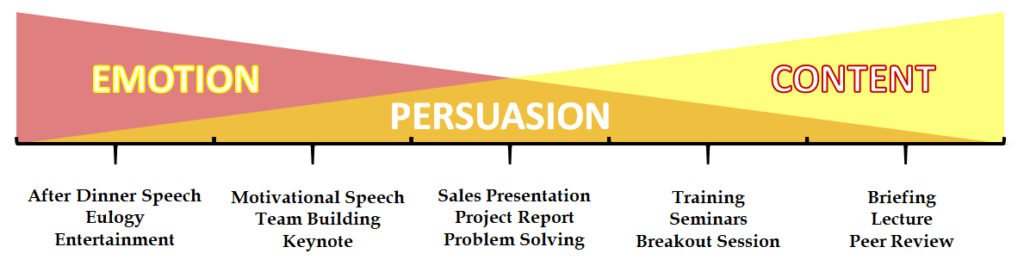
This diagram explains how your content and impact items shift depending on the purpose of the presentation. On the far left side of the chart are presentations that are for entertainment or to generate an emotion. The ones on the right side are presentations that are designed for knowledge or content.
When you look at the chart, there are two intersecting triangles. One triangle depicts “Content“ (the number of items covered). The other triangle represents the impact of ideas (the entertaining and interactive elements that are inserted into your presentation). The gold triangle in the middle, where the original triangles intersect, is where we are persuasive.
So, if you are designing a lecture or a briefing, your audience wants content. Entertainment isn’t a priority. However, if you are delivering a training session, your audience wants content, but they don’t want to be bored. When you need to persuade your boss to make a purchase, you might want to have a balance between content and emotion. If you are trying to motivate your team, some content is important, but they really want emotion. And finally, if you are delivering a wedding toast or a eulogy, emotion is way more important than content.
For details on How to Write a Eulogy or How to Deliver a Wedding Toast, see these posts.
So When You Design a Speech, How Many Bullets Do You Use?
The chart below shows how to adjust the number of bullets and supporting items to fit each type of presentation and hold your audience’s attention.
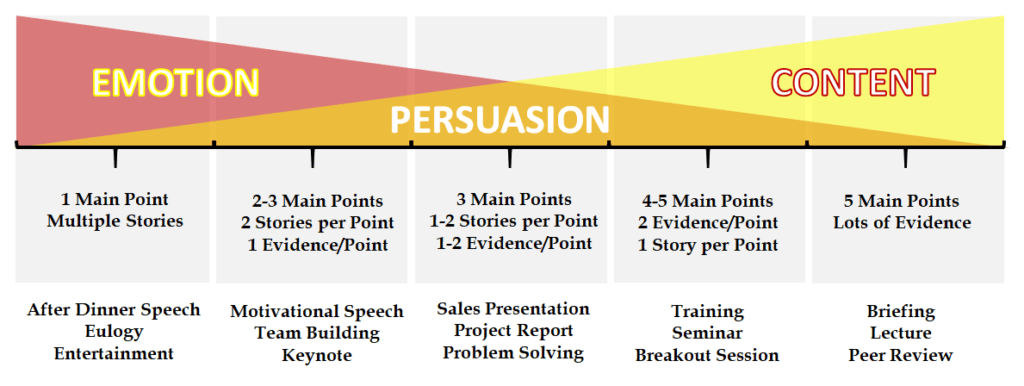
High-emotion speeches have one or two main points and lots of stories or examples for each point. High-content presentations have more bullets and fewer stories. So, if you are giving a eulogy or an after-dinner speech, you may only have a single theme or main idea. You might have three stories that explain that theme, however. For instance, a eulogy might have the theme, “My dad was a great father.” Then, you will likely tell three stories about how your dad helped you become the adult that you are today. For an end-of-year company banquet, the theme might be “A Celebration of Success.” During the after-dinner speech, the CEO might just tell a few of this year’s biggest company success stories.
On the other side of the chart, a briefing may have five key points and just a few examples or stories. For instance, we have weekly team meetings at our office. These meetings aren’t conducted to persuade or entertain. They are mainly used to deliver important information to the team so everyone is on the same page. So, we will often make a list of the three to five most important points that are key to the team’s performance. Since we don’t want to waste anyone’s time, we deliver these items in just a couple of minutes. The entire meeting may last just 10 to 15 minutes.
Since we don’t like boring meetings, we often either start or end these briefings with “good news.” This is a great way to let the team members tell a few success stories from the week. Our meetings are more fun that way.
Once You Know the Purpose, Design Your Presentations Based on the Guide.
Once you understand the purpose of your presentation, start designing your presentation. We have a handy Online Speech Creator that can help you organize your thoughts. The speech creator is designed for a three-point persuasive talk. However, you can use it to create other types of presentations as well.
The step-by-step guide is to do the following:
- Start with a Good Title – The title should be a summary of the results that the audience can expect from listening to the presentation.
For more details about how to create a great title, see the following: Create a Great Title for Your Presentation. You may also like Persuasive Speech Outline Example.
- Create Your Main Points Following the Guide Above – Your bullet points should be statements that you are trying to prove to your audience. Pretend like you are an attorney presenting to a jury. Your bullets should be statements that prove your case.
- Add Appropriate Impact Items to Prove Each Bullet Point – Use real-life examples or stories when possible. Analogies, quotes from experts, and other Impact Ideas can work as well. These items are proof that the statements you made are true.
These tips can be a powerful tool to help you quickly design an engaging and impactful presentation. Regardless of what presentation software you use to create your presentation, keep these tips in mind. The type of presentation you are giving determines the style of the presentation. It also plays a part in how many points you focus on. However, remember that our “Presentation Cabinet” uses the “Three Point Talk” which focuses on three bullet points.
Now, if you need help with design suggestions to create a balanced visual, then see: Power Point Tips. From using a simple chart to adding design elements, you want to be sure your presentation has a polished look to match the content and impact style.
Still Need Help?
Our class instructors are available during normal business hours every day. Call our presentation hotline at (800) 975-6151 for a free 15-minute consultation.
[formlift id=”54106″]